PYTHON

1.What is Python?
Python is a popular programming language. It was created by Guido van
Rossum, and released in 1991.
It is used for:
- web development (server-side),
- software development,
- mathematics,
- system scripting.
2.What can Python do?
- Python can be used on a server to create web applications.
- Python can be used alongside software to create workflows.
- Python can connect to database systems. It can also read and modify files.
- Python can be used to handle big data and perform complex mathematics.
- Python can be used for rapid prototyping, or for production-ready software development.
3.Why Python?
- Python works on different platforms (Windows, Mac, Linux, Raspberry Pi, etc).
- Python has a simple syntax similar to the English language.
- Python has syntax that allows developers to write programs with fewer lines than some other programming languages.
- Python runs on an interpreter system, meaning that code can be executed as soon as it is written. This means that prototyping can be very quick.
- Python can be treated in a procedural way, an object-oriented way or a functional way.
4.Python Syntax compared to other programming languages:
- Python was designed for readability, and has some similarities to the English language with influence from mathematics.
- Python uses new lines to complete a command, as opposed to other programming languages which often use semicolons or parentheses.
- Python relies on indentation, using whitespace, to define scope; such as the scope of loops, functions and classes. Other programming languages often use curly-brackets for this purpose.


Python Features:
Python provides many useful features which make it popular and valuable from the other programming languages. It supports object-oriented programming, procedural programming approaches and provides dynamic memory allocation. We have listed below a few essential features.

1) Easy to Learn and Use:
Python is easy to learn as compared to other programming languages. Its syntax is straightforward and much the same as the English language. There is no use of the semicolon or curly-bracket, the indentation defines the code block. It is the recommended programming language for beginners.
2) Expressive Language:
Python can perform complex tasks using a few lines of code. A simple example, the hello world program you simply type print("Hello World"). It will take only one line to execute, while Java or C takes multiple lines.
3) Interpreted Language:
Python is an interpreted language; it means the Python program is executed one line at a time. The advantage of being interpreted language, it makes debugging easy and portable.
4) Cross-platform Language:
Python can run equally on different platforms such as Windows, Linux, UNIX, and Macintosh, etc. So, we can say that Python is a portable language. It enables programmers to develop the software for several competing platforms by writing a program only once.
5) Free and Open Source:
Python is freely available for everyone. It is freely available on its official website www.python.org. It has a large community across the world that is dedicatedly working towards make new python modules and functions. Anyone can contribute to the Python community. The open-source means, "Anyone can download its source code without paying any penny."
6) Object-Oriented Language:
Python supports object-oriented language and concepts of classes and objects come into existence. It supports inheritance, polymorphism, and encapsulation, etc. The object-oriented procedure helps to programmer to write reusable code and develop applications in less code.
7) Extensible:
It implies that other languages such as C/C++ can be used to compile the code and thus it can be used further in our Python code. It converts the program into byte code, and any platform can use that byte code.
8) Large Standard Library:
It provides a vast range of libraries for the various fields such as machine learning, web developer, and also for the scripting. There are various machine learning libraries, such as Tensor flow, Pandas, Numpy, Keras, and Pytorch, etc. Django, flask, pyramids are the popular framework for Python web development.
9) GUI Programming Support:
Graphical User Interface is used for the developing Desktop application. PyQT5, Tkinter, Kivy are the libraries which are used for developing the web application.
10) Integrated:
It can be easily integrated with languages like C, C++, and JAVA, etc. Python runs code line by line like C,C++ Java. It makes easy to debug the code.
11. Embeddable:
The code of the other programming language can use in the Python source code. We can use Python source code in another programming language as well. It can embed other language into our code.
12. Dynamic Memory Allocation:
In Python, we don't need to specify the data-type of the variable. When we assign some value to the variable, it automatically allocates the memory to the variable at run time. Suppose we are assigned integer value 15 to x, then we don't need to write int x = 15. Just write x = 15.
Python Variables:
A variable is the name given to a memory location. A value-holding Python variable is also known as an identifier.
Since Python is an infer language that is smart enough to determine the type of a variable, we do not need to specify its type in Python.
Variable names must begin with a letter or an underscore, but they can be a group of both letters and digits.
The name of the variable should be written in lowercase. Both Rahul and rahul are distinct variables.
Identifier Naming:
Identifiers are things like variables. An Identifier is utilized to recognize the literals utilized in the program. The standards to name an identifier are given underneath.
- The variable's first character must be an underscore or alphabet (_).
- Every one of the characters with the exception of the main person might be a letter set of lower-case(a-z), capitalized (A-Z), highlight, or digit (0-9).
- White space and special characters (!, @, #, %, etc.) are not allowed in the identifier name. ^, &, *).
- Identifier name should not be like any watchword characterized in the language.
- Names of identifiers are case-sensitive; for instance, my name, and MyName isn't something very similar.
- Examples of valid identifiers: a123, _n, n_9, etc.
- Examples of invalid identifiers: 1a, n%4, n 9, etc.
Declaring Variable and Assigning Values:
- Python doesn't tie us to pronounce a variable prior to involving it in the application. It permits us to make a variable at the necessary time.
- In Python, we don't have to explicitly declare variables. The variable is declared automatically whenever a value is added to it.
- The equal (=) operator is utilized to assign worth to a variable.
Object References:
When we declare a variable, it is necessary to comprehend how the Python interpreter works. Compared to a lot of other programming languages, the procedure for dealing with variables is a little different.
Python is the exceptionally object-arranged programming language; Because of this, every data item is a part of a particular class. Think about the accompanying model.
Output:
John
The Python object makes a integer object and shows it to the control center. We have created a string object in the print statement above. Make use of the built-in type() function in Python to determine its type.
Output:
<class 'str'>
In Python, factors are an symbolic name that is a reference or pointer to an item. The factors are utilized to indicate objects by that name.
Let's understand the following example
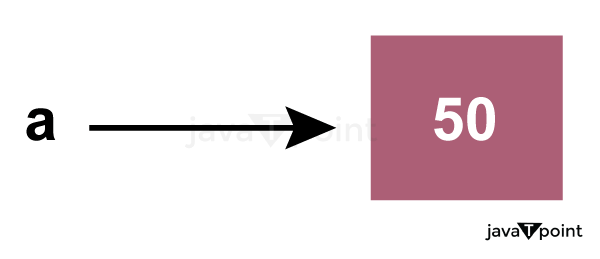
In the above image, the variable a refers to an integer object.
Suppose we assign the integer value 50 to a new variable b.
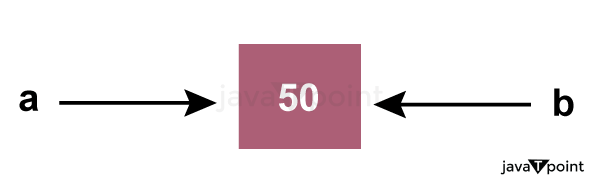
The variable b refers to the same object that a points to because Python does not create another object.
Let's assign the new value to b. Now both variables will refer to the different objects.
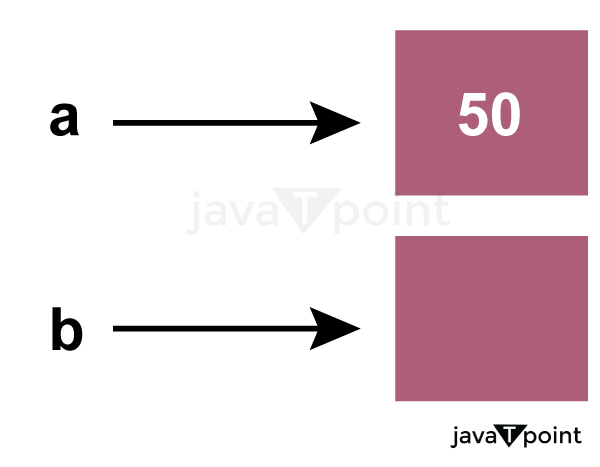
Python manages memory efficiently if we assign the same variable to two different values.
Object Identity
Every object created in Python has a unique identifier. Python gives the dependable that no two items will have a similar identifier. The object identifier is identified using the built-in id() function. consider about the accompanying model.
Output:
140734982691168
140734982691168
2822056960944
We assigned the b = a, an and b both highlight a similar item. The id() function that we used to check returned the same number. We reassign a to 500; The new object identifier was then mentioned.
Variable Names
The process for declaring the valid variable has already been discussed. Variable names can be any length can have capitalized, lowercase (start to finish, a to z), the digit (0-9), and highlight character(_). Take a look at the names of valid variables in the following example.
Output:
Devansh
20
80.5
Consider the following valid variables name.
Output:
A B C D E D E F G F I
We have declared a few valid variable names in the preceding example, such as name, _name_, and so on. However, this is not recommended because it may cause confusion when we attempt to read code. To make the code easier to read, the name of the variable ought to be descriptive.
The multi-word keywords can be created by the following method.
- Camel Case - In the camel case, each word or abbreviation in the middle of begins with a capital letter. There is no intervention of whitespace. For example - nameOfStudent, valueOfVaraible, etc.
- Pascal Case - It is the same as the Camel Case, but here the first word is also capital. For example - NameOfStudent, etc.
- Snake Case - In the snake case, Words are separated by the underscore. For example - name_of_student, etc.
Multiple Assignment
Multiple assignments, also known as assigning values to multiple variables in a single statement, is a feature of Python.
We can apply different tasks in two ways, either by relegating a solitary worth to various factors or doling out numerous qualities to different factors. Take a look at the following example.
1. Assigning single value to multiple variables
Eg:
Output:
50
50
50
2. Assigning multiple values to multiple variables:
Eg:
Output:
5
10
15
The values will be assigned in the order in which variables appear.
Python Variable Types:
There are two types of variables in Python - Local variable and Global variable. Let's understand the following variables.
Local Variable
The variables that are declared within the function and have scope within the function are known as local variables. Let's examine the following illustration.
Example -
Output:
The sum is: 50
Explanation:
We declared the function add() and assigned a few variables to it in the code above. These factors will be alluded to as the neighborhood factors which have scope just inside the capability. We get the error that follows if we attempt to use them outside of the function.
Output:
The sum is: 50
    print(a)
NameError: name 'a' is not defined
We tried to use local variable outside their scope; it threw the NameError.
Global Variables:
Global variables can be utilized all through the program, and its extension is in the whole program. Global variables can be used inside or outside the function.
By default, a variable declared outside of the function serves as the global variable. Python gives the worldwide catchphrase to utilize worldwide variable inside the capability. The function treats it as a local variable if we don't use the global keyword. Let's examine the following illustration.
Example -
Output:
101
Welcome To Javatpoint
Welcome To Javatpoint
Explanation:
In the above code, we declare a global variable x and give out a value to it. We then created a function and used the global keyword to access the declared variable within the function. We can now alter its value. After that, we gave the variable x a new string value and then called the function and printed x, which displayed the new value.
=
Delete a variable:
We can delete the variable using the del keyword. The syntax is given below.
Syntax -
In the following example, we create a variable x and assign value to it. We deleted variable x, and print it, we get the error "variable x is not defined". The variable x will no longer use in future.
Example -
Output:
6 Traceback (most recent call last): File "C:/Users/DEVANSH SHARMA/PycharmProjects/Hello/multiprocessing.py", line 389, inprint(x) NameError: name 'x' is not defined
Maximum Possible Value of an Integer in Python:
Python, to the other programming languages, does not support long int or float data types. It uses the int data type to handle all integer values. The query arises here. In Python, what is the maximum value that the variable can hold? Take a look at the following example.
Example -
Output:
<class 'int'>
10000000000000000000000000000000000000000001
As we can find in the above model, we assigned a large whole number worth to variable x and really look at its sort. It printed class <int> not long int. As a result, the number of bits is not limited, and we are free to use all of our memory.
There is no special data type for storing larger numbers in Python.
Print Single and Numerous Factors in Python
We can print numerous factors inside the single print explanation. The examples of single and multiple printing values are provided below.
Example - 1 (Printing Single Variable)
Output:
5
5
Example - 2 (Printing Multiple Variables)
Output:
5 6
1 2 3 4 5 6 7 8
Basic Fundamentals:
This section contains the fundamentals of Python, such as:
i)Tokens and their types.
ii) Comments
a)Tokens:
- The tokens can be defined as a punctuator mark, reserved words, and each word in a statement.
- The token is the smallest unit inside the given program.
There are following tokens in Python:
- Keywords.
- Identifiers.
- Literals.
- Operators.
We will discuss above the tokens in detail next tutorials.
Python Data Types
Every value has a datatype, and variables can hold values. Python is a powerfully composed language; consequently, we don't have to characterize the sort of variable while announcing it. The interpreter binds the value implicitly to its type.
We did not specify the type of the variable a, which has the value five from an integer. The Python interpreter will automatically interpret the variable as an integer.
We can verify the type of the program-used variable thanks to Python. The type() function in Python returns the type of the passed variable.
Consider the following illustration when defining and verifying the values of various data types.
Output:
<type 'int'>
<type 'str'>
<type 'float'>
Standard data types
A variable can contain a variety of values. On the other hand, a person's id must be stored as an integer, while their name must be stored as a string.
The storage method for each of the standard data types that Python provides is specified by Python. The following is a list of the Python-defined data types.
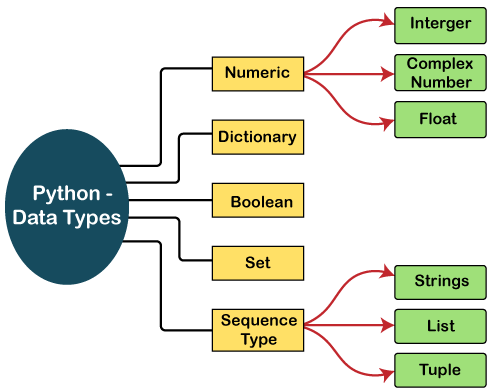
The data types will be briefly discussed in this tutorial section. We will talk about every single one of them exhaustively later in this instructional exercise.
Numbers:
Numeric values are stored in numbers. The whole number, float, and complex qualities have a place with a Python Numbers datatype. Python offers the type() function to determine a variable's data type. The instance () capability is utilized to check whether an item has a place with a specific class.
When a number is assigned to a variable, Python generates Number objects. For instance,
Output:
The type of a <class 'int'>
The type of b <class 'float'>
The type of c <class 'complex'>
c is complex number: True
Python supports three kinds of numerical data.
- Int: Whole number worth can be any length, like numbers 10, 2, 29, - 20, - 150, and so on. An integer can be any length you want in Python. Its worth has a place with int.
- Float: Float stores drifting point numbers like 1.9, 9.902, 15.2, etc. It can be accurate to within 15 decimal places.
- Complex: An intricate number contains an arranged pair, i.e., x + iy, where x and y signify the genuine and non-existent parts separately. The complex numbers like 2.14j, 2.0 + 2.3j, etc.
Sequence Type:
String:
The sequence of characters in the quotation marks can be used to describe the string. A string can be defined in Python using single, double, or triple quotes.
String dealing with Python is a direct undertaking since Python gives worked-in capabilities and administrators to perform tasks in the string.
When dealing with strings, the operation "hello"+" python" returns "hello python," and the operator + is used to combine two strings.
Because the operation "Python" *2 returns "Python," the operator * is referred to as a repetition operator.
The Python string is demonstrated in the following example.
Example - 1
Output:
string using double quotes
A multiline
string
Look at the following illustration of string handling.
Example - 2
Output:
he
o
hello javatpointhello javatpoint
hello javatpoint how are you
List:
Lists in Python are like arrays in C, but lists can contain data of different types. The things put away in the rundown are isolated with a comma (,) and encased inside square sections [].
To gain access to the list's data, we can use slice [:] operators. Like how they worked with strings, the list is handled by the concatenation operator (+) and the repetition operator (*).
Look at the following example.
Example:
Output:
[1, 'hi', 'Python', 2]
[2]
[1, 'hi']
[1, 'hi', 'Python', 2, 1, 'hi', 'Python', 2]
[1, 'hi', 'Python', 2, 1, 'hi', 'Python', 2, 1, 'hi', 'Python', 2]
Tuple:
In many ways, a tuple is like a list. Tuples, like lists, also contain a collection of items from various data types. A parenthetical space () separates the tuple's components from one another.
Because we cannot alter the size or value of the items in a tuple, it is a read-only data structure.
Let's look at a straightforward tuple in action.
Example:
Output:
<class 'tuple'>
('hi', 'Python', 2)
('Python', 2)
('hi',)
('hi', 'Python', 2, 'hi', 'Python', 2)
('hi', 'Python', 2, 'hi', 'Python', 2, 'hi', 'Python', 2)

Traceback (most recent call last):
  File "main.py", line 14, in <module>
    t[2] = "hi";
TypeError: 'tuple' object does not support item assignment
Dictionary:
A dictionary is a key-value pair set arranged in any order. It stores a specific value for each key, like an associative array or a hash table. Value is any Python object, while the key can hold any primitive data type.
The comma (,) and the curly braces are used to separate the items in the dictionary.
Look at the following example.
Output:
1st name is Jimmy
2nd name is mike
{1: 'Jimmy', 2: 'Alex', 3: 'john', 4: 'mike'}
dict_keys([1, 2, 3, 4])
dict_values(['Jimmy', 'Alex', 'john', 'mike'])
Boolean:
True and False are the two default values for the Boolean type. These qualities are utilized to decide the given assertion valid or misleading. The class book indicates this. False can be represented by the 0 or the letter "F," while true can be represented by any value that is not zero.
Look at the following example.
Output:
<class 'bool'>
<class 'bool'>
NameError: name 'false' is not defined
Set:
The data type's unordered collection is Python Set. It is iterable, mutable(can change after creation), and has remarkable components. The elements of a set have no set order; It might return the element's altered sequence. Either a sequence of elements is passed through the curly braces and separated by a comma to create the set or the built-in function set() is used to create the set. It can contain different kinds of values.
Look at the following example.
Output:
{3, 'Python', 'James', 2}
{'Python', 'James', 3, 2, 10}
{'Python', 'James', 3, 10}
Python Keywords
Every scripting language has designated words or keywords, with particular definitions and usage guidelines. Python is no exception. The fundamental constituent elements of any Python program are Python keywords.
This tutorial will give you a basic overview of all Python keywords and a detailed discussion of some important keywords that are frequently used.
Introducing Python Keywords:
Python keywords are unique words reserved with defined meanings and functions that we can only apply for those functions. You'll never need to import any keyword into your program because they're permanently present.
Python's built-in methods and classes are not the same as the keywords. Built-in methods and classes are constantly present; however, they are not as limited in their application as keywords.
Assigning a particular meaning to Python keywords means you can't use them for other purposes in our code. You'll get a message of SyntaxError if you attempt to do the same. If you attempt to assign anything to a built-in method or type, you will not receive a SyntaxError message; however, it is still not a smart idea.
Python contains thirty-five keywords in the most recent version, i.e., Python 3.8. Here we have shown a complete list of Python keywords for the reader's reference.
| False | await | else | import | pass |
| None | break | except | in | raise |
| True | class | finally | is | return |
| and | continue | for | lambda | try |
| as | def | from | nonlocal | while |
| assert | del | global | not | with |
| async | elif | if | or | yield |
In distinct versions of Python, the preceding keywords might be changed. Some extras may be introduced, while others may be deleted. By writing the following statement into the coding window, you can anytime retrieve the collection of keywords in the version you are working on.
Code
Output:
The set of keywords in this version is :
['False', 'None', 'True', 'and', 'as', 'assert', 'async', 'await', 'break', 'class', 'continue', 'def', 'del', 'elif', 'else', 'except', 'finally', 'for', 'from', 'global', 'if', 'import', 'in', 'is', 'lambda', 'nonlocal', 'not', 'or', 'pass', 'raise', 'return', 'try', 'while', 'with', 'yield']
By calling help(), you can retrieve a list of currently offered keywords:
Code:
How to Identify Python Keywords
Python's keyword collection has evolved as new versions were introduced. The await and async keywords, for instance, were not introduced till Python 3.7. Also, in Python 2.7, the words print and exec constituted keywords; however, in Python 3+, they were changed into built-in methods and are no longer part of the set of keywords. In the paragraphs below, you'll discover numerous methods for determining whether a particular word in Python is a keyword or not.
Write Code on a Syntax Highlighting IDE
There are plenty of excellent Python IDEs available. They'll all highlight keywords to set them apart from the rest of the terms in the code. This facility will assist you in immediately identifying Python keywords during coding so that you do not misuse them.
Verify Keywords with Script in a REPL
There are several ways to detect acceptable Python keywords plus know further regarding them in the Python REPL.
Look for a SyntaxError
Lastly, if you receive a SyntaxError when attempting to allocate to it, name a method with it, or do anything else with that, and it isn't permitted, it's probably a keyword. This one is somewhat more difficult to see, but it is still a technique for Python to tell you if you're misusing a keyword.
Python Keywords and Their Usage
The following sections categorize Python keywords under the headings based on their frequency of use. The first category, for instance, includes all keywords utilized as values, whereas the next group includes keywords employed as operators. These classifications will aid in understanding how keywords are employed and will assist you in arranging the huge collection of Python keywords.
- A few terms mentioned in the segment following may be unfamiliar to you. They're explained here, and you must understand what they mean before moving on:
- The Boolean assessment of a variable is referred to as truthfulness. A value's truthfulness reveals if the value of the variable is true or false.
In the Boolean paradigm, truth refers to any variable that evaluates to true. Pass an item as an input to bool() to see if it is true. If True is returned, the value of the item is true. Strings and lists which are not empty, non-zero numbers, and many other objects are illustrations of true values.
False refers to any item in a Boolean expression that returns false. Pass an item as an input to bool() to see if it is false. If False is returned, the value of the item is false. Examples of false values are " ", 0, { }, and [ ].
Value Keywords: True, False, None
Three Python keywords are employed as values in this example. These are singular values, which we can reuse indefinitely and every time correspond to the same entity. These values will most probably be seen and used frequently.
The Keywords True and False:
These keywords are typed in lowercase in conventional computer languages (true and false); however, they are typed in uppercase in Python every time. In Python script, the True Python keyword represents the Boolean true state. False is a keyword equivalent to True, except it has the negative Boolean state of false.
True and False are those keywords that can be allocated to variables or parameters and are compared directly.
Code:
Output:
True
False
True
True
False
False
Because the first, third, and fourth statements are true, the interpreter gives True for those and False for other statements. True and False are the equivalent in Python as 1 & 0. We can use the accompanying illustration to support this claim:
Code
Output:
False
True
3
The None Keyword
None is a Python keyword that means "nothing." None is known as nil, null, or undefined in different computer languages.
If a function does not have a return clause, it will give None as the default output:
Code
Output:
False
False
False
True
If a no_return_function returns nothing, it will simply return a None value. None is delivered by functions that do not meet a return expression in the program flow. Consider the following scenario:
Code
Output:
None
This program has a function with_return that performs multiple operations and contains a return expression. As a result, if we display a number, we get None, which is given by default when there is no return statement. Here's an example showing this:
Code
Output:
None
Operator Keywords: and, or, not, in, is
Several Python keywords are employed as operators to perform mathematical operations. In many other computer languages, these operators are represented by characters such as &, |, and!. All of these are keyword operations in Python:
| Mathematical Operations | Operations in Other Languages | Python Keyword |
|---|---|---|
| AND, ∧ | && | and |
| OR, ∨ | || | or |
| NOT, ¬ | ! | not |
| CONTAINS, ∈ | in | |
| IDENTITY | === | is |
Writers created Python programming with clarity in mind. As a result, many operators in other computer languages that employ characters in Python are English words called keywords.
The and Keyword:
The Python keyword and determines whether both the left-hand side and right-hand side operands and are true or false. The outcome will be True if both components are true. If one is false, the outcome will also be False:
| Truth table for and | ||
|---|---|---|
| X | Y | X and Y |
| True | True | True |
| False | True | False |
| True | False | False |
| False | False | False |
It's worth noting that the outcomes of an and statement aren't always True or False. Due to and's peculiar behavior, this is the case. Instead of processing the inputs to corresponding Boolean values, it just gives <component1> if it is false or <component2> if it is true. The outputs of a and expression could be utilized with a conditional if clause or provided to bool() to acquire an obvious True or False answer.
The or Keyword:
The or keyword in Python is utilized to check if, at minimum, 1 of the inputs is true. If the first argument is true, the or operation yields it; otherwise, the second argument is returned:
Similarly to the and keyword, the or keyword does not change its inputs to corresponding Boolean values. Instead, the outcomes are determined based on whether they are true or false.
| Truth table for or | ||
|---|---|---|
| X | Y | X or Y |
| True | True | True |
| True | False | True |
| False | True | True |
| False | False | False |
The not Keyword:
The not keyword in Python is utilized to acquire a variable's contrary Boolean value:
The not keyword is employed to switch the Boolean interpretation or outcome in conditional sentences or other Boolean equations. Not, unlike and, and or, determines the specific Boolean state, True or False, afterward returns the inverse.
| Truth Table for not | |
|---|---|
| X | not X |
| True | False |
| False | True |
Code:
Output:
False
True
False
The in Keyword:
The in keyword of Python is a robust confinement checker, also known as a membership operator. If you provide it an element to seek and a container or series to seek into, it will give True or False, depending on if that given element was located in the given container:
Testing for a certain character in a string is a nice illustration of how to use the in keyword:
Code:
Output:
True
False
Lists, dictionaries, tuples, strings, or any data type with the method __contains__(), or we can iterate over it will work with the in keyword.
The is Keyword:
In Python, it's used to check the identification of objects. The == operation is used to determine whether two arguments are identical. It also determines whether two arguments relate to the unique object.
When the objects are the same, it gives True; otherwise, it gives False.
Code:
Output:
True
False
False
True
True, False, and None are all the same in Python since there is just one version.
Code
Output:
True
False
True
False
A blank dictionary or list is the same as another blank one. However, they aren't identical entities because they are stored independently in memory. This is because both the list and the dictionary are changeable.
Code:
Output:
True
True
Strings and tuples, unlike lists and dictionaries, are unchangeable. As a result, two equal strings or tuples are also identical. They're both referring to the unique memory region.
The nonlocal Keyword:
Nonlocal keyword usage is fairly analogous to global keyword usage. The keyword nonlocal is designed to indicate that a variable within a function that is inside a function, i.e., a nested function is just not local to it, implying that it is located in the outer function. We must define a non-local parameter with nonlocal if we ever need to change its value under a nested function. Otherwise, the nested function creates a local variable using that title. The example below will assist us in clarifying this.
Code:
Output:
The value inside the inner function:  14
The value inside the outer function:  14
the_inner_function() is placed inside the_outer_function in this case.
The the_outer_function has a variable named var. Var is not a global variable, as you may have noticed. As a result, if we wish to change it inside the the_inner_function(), we should declare it using nonlocal.
As a result, the variable was effectively updated within the nested the_inner_function, as evidenced by the results. The following is what happens if you don't use the nonlocal keyword:
Code:
Output:
Value inside the inner function:  14
Value inside the outer function:  10
Iteration Keywords: for, while, break, continue:
The iterative process and looping are essential programming fundamentals. To generate and operate with loops, Python has multiple keywords. These would be utilized and observed in almost every Python program. Knowing how to use them correctly can assist you in becoming a better Python developer.
The for Keyword:
The for loop is by far the most popular loop in Python. It's built by blending two Python keywords. They are for and in, as previously explained.
The while Keyword:
Python's while loop employs the term while and functions similarly to other computer languages' while loops. The block after the while phrase will be repeated repeatedly until the condition following the while keyword is false.
The break Keyword:
If you want to quickly break out of a loop, employ the break keyword. We can use this keyword in both for and while loops.
The continue Keyword:
You can use the continue Python keyword if you wish to jump to the subsequent loop iteration. The continue keyword, as in many other computer languages, enables you to quit performing the present loop iteration and go on to the subsequent one.
Code:
Output:
4 5 6 7 8 9 10 11 12 13
2 3 4 5 6 7 8 9 10 14 15 16
Exception Handling Keywords - try, except, raise, finally, and assert:
try: This keyword is designed to handle exceptions and is used in conjunction with the keyword except to handle problems in the program. When there is some kind of error, the program inside the "try" block is verified, but the code in that block is not executed.
except: As previously stated, this operates in conjunction with "try" to handle exceptions.
finally: Whatever the outcome of the "try" section, the "finally" box is implemented every time.
raise: The raise keyword could be used to specifically raise an exception.
assert: This method is used to help in troubleshooting. Often used to ensure that code is correct. Nothing occurs if an expression is interpreted as true; however, if it is false, "AssertionError" is raised. An output with the error, followed by a comma, can also be printed.
Code:
Output:
We cannot divide by zero This is inside finally block The value of var1 / var2 is : --------------------------------------------------------------------------- AssertionError Traceback (most recent call last) Input In [44], in| () 15 # by using assert keyword we will check if var2 is 0 16 print ("The value of var1 / var2 is : ") ---> 17 assert var2 != 0, "Divide by 0 error" 18 print (var1 / var2) AssertionError: Divide by 0 error |
The pass Keyword:
In Python, a null sentence is called a pass. It serves as a stand-in for something else. When it is run, nothing occurs.
Let's say we possess a function that has not been coded yet however we wish to do so in the long term. If we write just this in the middle of code,
Code:
Output:
def function_pass( arguments ):
                                   ^
IndentationError: expected an indented block after function definition on line 1
as shown, IndentationError will be thrown. Rather, we use the pass command to create a blank container.
Code:
We can use the pass keyword to create an empty class too.
Code:
The return Keyword:
The return expression is used to leave a function and generate a result.
The None keyword is returned by default if we don't specifically return a value. The accompanying example demonstrates this.
Code
Output:
13
None
The del Keyword:
The del keyword is used to remove any reference to an object. In Python, every entity is an object. We can use the del command to remove a variable reference.
Code:
Output:
5 --------------------------------------------------------------------------- NameError Traceback (most recent call last) Input In [42], in| () 2 del var1 3 print( var2 ) ----> 4 print( var1 ) NameError: name 'var1' is not defined |
We can notice that the variable var1's reference has been removed. As a result, it's no longer recognized. However, var2 still exists.
Deleting entries from a collection like a list or a dictionary is also possible with del:
Code:
Output:
['A', 'B']
Python Literals
Python Literals can be defined as data that is given in a variable or constant.
Python supports the following literals:
1. String literals:
String literals can be formed by enclosing a text in the quotes. We can use both single as well as double quotes to create a string.
Example:
Types of Strings:
There are two types of Strings supported in Python:
a) Single-line String- Strings that are terminated within a single-line are known as Single line Strings.
Example:
b) Multi-line String - A piece of text that is written in multiple lines is known as multiple lines string.
There are two ways to create multiline strings:
1) Adding black slash at the end of each line.
Example:
'hellouser'
2) Using triple quotation marks:-
Example:
Output:
welcome
to
SSSIT
II. Numeric literals:
Numeric Literals are immutable. Numeric literals can belong to following four different numerical types.
| Int(signed integers) | Long(long integers) | float(floating point) | Complex(complex) |
|---|---|---|---|
| Numbers( can be both positive and negative) with no fractional part.eg: 100 | Integers of unlimited size followed by lowercase or uppercase L eg: 87032845L | Real numbers with both integer and fractional part eg: -26.2 | In the form of a+bj where a forms the real part and b forms the imaginary part of the complex number. eg: 3.14j |
Example - Numeric Literals:
Output:
20 100 141 301
100.5 150.0
(5+3.14j) 3.14 5.0
III. Boolean literals:
A Boolean literal can have any of the two values: True or False.
Example - Boolean Literals:
Output:
x is True
y is False
z is False
a: 11
b: 10
IV. Special literals.
Python contains one special literal i.e., None.
None is used to specify to that field that is not created. It is also used for the end of lists in Python.
Example - Special Literals
Output:
10
None
V. Literal Collections.
Python provides the four types of literal collection such as List literals, Tuple literals, Dict literals, and Set literals.
List:
- List contains items of different data types. Lists are mutable i.e., modifiable.
- The values stored in List are separated by comma(,) and enclosed within square brackets([]). We can store different types of data in a List.
Example - List literals
Output:
['John', 678, 20.4, 'Peter']
['John', 678, 20.4, 'Peter', 456, 'Andrew']
Dictionary:
- Python dictionary stores the data in the key-value pair.
- It is enclosed by curly-braces {} and each pair is separated by the commas(,).
Example
Output:
{'name': 'Pater', 'Age': 18, 'Roll_nu': 101}
Tuple:
- Python tuple is a collection of different data-type. It is immutable which means it cannot be modified after creation.
- It is enclosed by the parentheses () and each element is separated by the comma(,).
Example
Output:
(10, 20, 'Dev', [2, 3, 4])
Set :
- Python set is the collection of the unordered dataset.
- It is enclosed by the {} and each element is separated by the comma(,).
Example: - Set Literals :
Output:
{'guava', 'apple', 'papaya', 'grapes'}
Comments
Post a Comment